Overview
The Port Controller plugin provides a generalized way to quickly and easily integrate devices connected via serial, TCP, GPIB, and USBTMC. It provides both an interface for manually sending commands (backed by a configurable command library) as well as the ability to send an initialization command sequence and a periodically polling command sequence. It also provides subscription handling its own computations for initialization (runs once when the plugin is launched), subscription (runs computations based on specified publishing plugin instances when data arrives), and intermediates (run after every subscription message is handled) sections which allows the plugin to be responsive and dynamic to any subscription data.
When sending initial commands or periodic commands, each command sent can optionally handle a response and compute any important data into a VAR container. An error checking configuration allows specifying a command sequence to run after the initialization command sequence completes and after each periodic polling command sequence pass completes, in order to check the device for errors. A boolean error condition in that section allows for specifying whether an error occurred on the device, where notably that error will be handled by the plugin like any other errors, including writing the error to log files and to the user interface.
If polling is enabled, both publishing and data logging are options. If publishing is enabled, a configurable publish object is provided which may contain any data in the VAR container and of course use inline expressions where helpful. If data logging is enabled, a full logger configuration is provided to store any data in any specified format (ex. in CSV form). Also worth noting is an activity log which tracks the operation of the plugin. This is both stored to file if enabled and also displays in the user interace, including log entries for when the UI has been initialized, when the intiailization command sequence has been sent, the enable state of periodic polling, publishing, data logging, and activity logging, and any commands manually issued by the user. Further operational details are discussed in the Uesr Interface section below.
User Interface
Below we see an example of the plugin’s user interface, which is divided into 3 major sections: left, right, and bottom
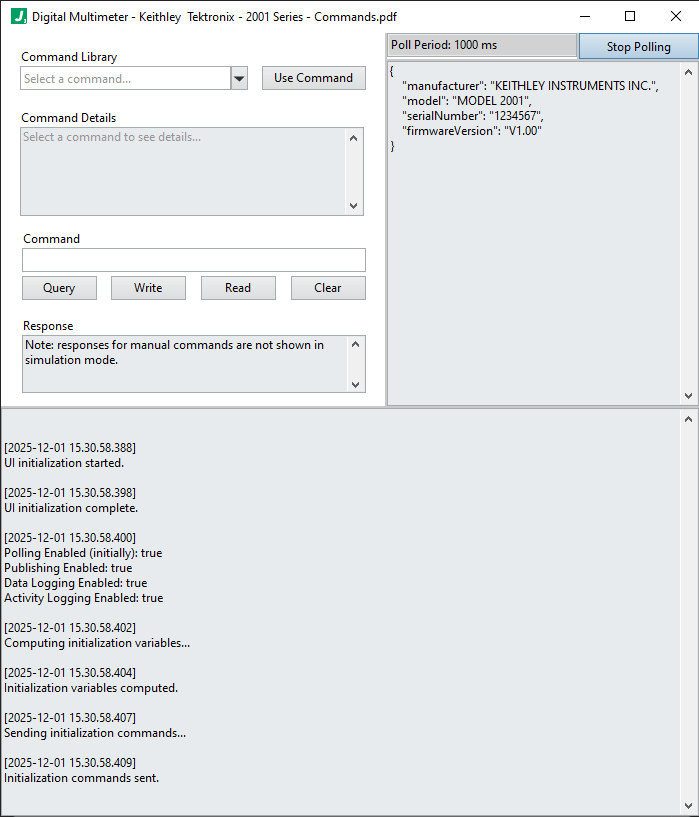
The left section is the manual control section. It provides a list of configured commands for the device as helpful documentation for the user, along with a section for sending commands manually and observing any responses.
The right section displays the poll period and also has a button to manually enable/disable polling (this is also configurable of course). Below that we have a view of the current variables which have been computed into the VAR container (the main variable container into which all command, polling, and subscription computations will compute.) And below that we have the latest published data.
The bottom section shows the activity log. This generally tracks the history of important events which occur in the plugin such as initialization, the enable states of polling, publishing, data logging, and activity logging (i.e. whether the plugin is configured to store the activity log to file), as well as any commands and responses issued manually in by the user. It does not capture the poll commands which occur at the poll period, as that would overload the log with periodically sent commands and ultimately make it harder to read (which defeats the purpose of the activity log). If poll commands are enabled, they are occuring at the specified poll period.
Periodic Polling
This plugin may be configured to periodically send commands and/or receive responses from the device or devices connected to the port defined in the connection configuration. The commands specified here effectively call or execute a command from the commandLibrary. More specifically, the polling.commands element is an array of such command calls.
For example, suppose the commandLibrary has the following Fetch Voltage command:
"Fetch Voltage": {
    "description": "Fetches the latest voltage measurement reading from the instrument.",
    "write": {
        "enable": true,
        "template": ":FETCH @PARAM{unit}?\n",
        "example": ":FETCH mV?\n"
    },
    "read": {
        "enable": true,
        "simulationResponse": "+100.234E+00\n",
        "responseRegex": "((?&number))\\s*",
        "responseComputations": [
            {
                "voltage": "@VAR{submatch[0]}"
            }
        ]
    }
}
This command in the commandLibrary takes a single unit parameter, sends a command, and parses the response to extract the returned voltage while assigning it to a variable named voltage into the VAR container. This is a key point: library commands can compute variables directly into the VAR container for us. As we shall see, we have the opportunity to perform further computations when we call such library commands. Below is how we can use this library command in the polling.commands section, where we perform a further computation on the voltage to transform it from units of mV to Volts (just to show this):
{
    "name": "Fetch Voltage",
    "parameters": {
        "unit": "mV" // we ask the instrument for the measurement in millivolts
    },
    "responseComputations": [
        "voltageInVolts": "Float:(@VAR{voltage} / 1000)" // we compute a new variable which stores the voltage in Volts
    ],
    "delayAfter": 0
}
Now, the possible units will be dictated by the instrument, of course, but we get to specify the library function name, parameters, responseComputations, and delayAfter (which is a value in milliseconds).
Incoming Message Handling
This plugin accepts messages to facilitate sending commands to the connected device. For example, we could use a State Machine plugin instance to send a message to this plugin. All messages handled by this plugin must be in JSON format and have a top level data key and should also have an operation key, although messages which do not include it will be treated as arriving subscription data. If the operation key is “Send Library Commands”, then data is an array of “command calls” with the same format as described in the polling section above. If an operation key is either not included, or anything other than “Send Library Commands”, then the incoming message is treated as a subsscription message and is handled by the subscriptionHandling section of configuration described below.
Send Library Commands
The Send Library Commands message allows sending any command configured in the plugin instance’s commandLibrary. On the one hand, the commandLibrary is intended to ease manually sending commands to the connected device or using the polling section. But those library commands can also be issued remotely (from other plugins) by sending a Send Library Commands message to this plugin.
Let’s see an example of the message format the Port Controller plugin expects in order to execute commands sent from some other plugin. Much like the polling section described above, we expect to receive an array of command calls.
{
    "operation": "Send Library Commands",
    "data": [
        {
            "name": "Fetch Voltage", // name of a command in the commandLibrary
            "parameters": {
                "unit": "mV" // we ask the instrument for the measurement in millivolts
            },
            "responseComputations": [
                "voltageInVolts": "Float:(@VAR{voltage} / 1000)" // we compute a new variable which stores the voltage in Volts
            ],
            "delayAfter": 0
        }
    ]
}
Subscription Handling
Any message received from another plugin which doesn’t have an operation key equal to Send Library Commands will be treated as a subscription message. For subscription messages, we simply have the opportunity to compute subscription data into our VAR variable container. Suppose we subscribed to a plugin instance named “My Publisher” which sends messages with the form of the example below:
{
    "instanceName": "My Publisher",
    "voltage": 7.5
}
Then in the subscriptionHandling.computations section we could compute the received voltage into our VAR container. Arriving data is placed into a SUB variable container, and we specify how to handle subscriptions from a given source as shown in the example snippet below:
"subscriptionHandling": {
    "computations": {
        ...
        "subscriptions": {

            "My Publisher": {
                "MyPublishervoltage": "Float:(@SUB{voltage})"
            }

        },
        ...
    }
}
Notice that under the subscriptions key we have keys whose names must match the instanceName of the sender. Under that key, we can then assign or compute the incoming subscription values.
Configuration Example
Configuration Details
ROOT object
This top level object holds all configuration information for this plugin.
Required: true
Default: (not specified; see any element defaults within)
subscribesTo array
An array of plugin instance names corresponding to plugin instances which will be subscribed to by this plugin instance.
Required: false
subscribesTo[n] string
A plugin instance name (corresponding to a plugin you wish to subscribe to) or a topic published by the worker (ex. __PLUGIN_INFO__).
Required: false
Default: ""
options object
Configuration options specific to this plugin. Note that variables and expressions are generally allowed in this section.
Required: true
Default: (not specified; see any element defaults within)
options.connection object
Defines the Port connection configuration.
Required: true
Default: {
"Type": "TCP",
"SimulationMode": true,
"Address": "TCPIP0::192.168.1.1::54321::SOCKET",
"Timeout": 2000,
"TerminationEnable": true,
"TerminationCharacter": "\n",
"TrimResponseWhiteSpace": true,
"BytesToRead": 1000,
"ReadToFileEnable": false,
"ReadToFilePath": "",
"DuplicateSession": false,
"AccessMode": "VISA Defaults"
}
options.connection::{TCP|GPIB|USBTMC} object
An object defining a VISA connection configuration for a TCP, GPIB, or USBTMC device.
Required: false
Default: (not specified; see any element defaults within)
options.connection::{TCP|GPIB|USBTMC}.Type enum (string)
The type of connection.
Required: true
Default: "TCP"
Enum Items: "TCP" | "GPIB" | "USBTMC"
options.connection::{TCP|GPIB|USBTMC}.SimulationMode boolean
Whether to run the plugin in simulation mode. See simulationLoopDelay and simluationResponse above, as well as responseRegex.
Required: true
Default: true
options.connection::{TCP|GPIB|USBTMC}.Address stringarray
The address of the connection / port such as COM1, GPIB1::3::INSTR, TCPIP0::192.168.1.1::54321::SOCKET, USB0::0x2EC7::0x6900::800774011787410049::INSTR, etc. or an array of such addresses. If an array is specified, the plugin uses the first address in the list to successfully open a connection. If none in the array succeed, an error is generated. For TCP connections, note that the number 0 in TCPIP0 is the board number, or interface index, which refers to the local network card. In windows, use the following command in the command prompt / terminal to list the network interfaces and their interface indexes: netsh interface ipv4 show interfaces
Required: true
Default: "TCPIP0::192.168.1.1::54321::SOCKET"
options.connection::{TCP|GPIB|USBTMC}.Timeout integer
The timeout duration in milliseconds used for write and read operations.
Required: true
Default: 2000
options.connection::{TCP|GPIB|USBTMC}.TerminationEnable boolean
Whether to look for termination characters in responses.
Required: true
Default: true
options.connection::{TCP|GPIB|USBTMC}.TerminationCharacter string
The termination character to look for (if termination is enabled).
Required: true
Default: "\n"
options.connection::{TCP|GPIB|USBTMC}.TrimResponseWhiteSpace boolean
Whether to trim whitespace from responses.
Required: true
Default: true
options.connection::{TCP|GPIB|USBTMC}.BytesToRead integer
The number of bytes to read when reading responses. Note: read operations will terminate on: 1. a termination character, 2. on timeout, 3. on receiving BytesToRead number of bytes.
Required: true
Default: 1000
options.connection::{TCP|GPIB|USBTMC}.ReadToFileEnable boolean
Wehther to enable reading responses directly to a specified file.
Required: true
Default: false
options.connection::{TCP|GPIB|USBTMC}.ReadToFilePath string
The file path to read responses into (if ReadToFileEnable is true).
Required: true
Default: ""
options.connection::{TCP|GPIB|USBTMC}.DuplicateSession boolean
Whether to duplicate the session.
Required: true
Default: false
options.connection::{TCP|GPIB|USBTMC}.AccessMode enum (string)
The access mode to use when opening the VISA session: VISA Defaults, Exclusive Lock, Load Configured Settings.
Required: true
Default: "VISA Defaults"
Enum Items: "VISA Defaults" | "Exclusive Lock" | "Load Configured Settings"
options.connection::{Serial} object
An object defining a VISA connection configuration for a TCP, GPIB, or USBTMC device.
Required: false
Default: (not specified; see any element defaults within)
options.connection::{Serial}.Type enum (string)
The type of connection.
Required: true
Default: "Serial"
Enum Items: "Serial"
options.connection::{Serial}.SimulationMode boolean
Whether to run the plugin in simulation mode. See simulationLoopDelay and simluationResponse above, as well as responseRegex.
Required: true
Default: true
options.connection::{Serial}.Address string
The address of the serial port.
Required: true
Default: "COM1"
options.connection::{Serial}.Timeout integer
The timeout duration in milliseconds used for write and read operations.
Required: true
Default: 2000
options.connection::{Serial}.TerminationEnable boolean
Whether to look for termination characters in responses.
Required: true
Default: true
options.connection::{Serial}.TerminationCharacter string
The termination character to look for (if termination is enabled).
Required: true
Default: "\n"
options.connection::{Serial}.TrimResponseWhiteSpace boolean
Whether to trim whitespace from responses.
Required: true
Default: true
options.connection::{Serial}.BytesToRead integer
The number of bytes to read when reading responses. Note: read operations will terminate on: 1. a termination character, 2. on timeout, 3. on receiving BytesToRead number of bytes.
Required: true
Default: 1000
options.connection::{Serial}.ReadToFileEnable boolean
Wehther to enable reading responses directly to a specified file.
Required: true
Default: false
options.connection::{Serial}.ReadToFilePath string
The file path to read responses into (if ReadToFileEnable is true).
Required: true
Default: ""
options.connection::{Serial}.BaudRate integer
The baud rate to use for serial communication. The available baud rates depend on the serial interface. Common baud rates include: 300, 600, 1200, 2400, 4800, 9600, 38400, 14400, 19200, 57600, 230400, 115200, 460800. Less common though not terrifically uncommon baud rates include: 100, 28800, 56000, 128000, 153600, 256000, 921600.
Required: true
Default: 9600
options.connection::{Serial}.DataBits enum (integer)
The number of data bits used for underlying character encoding for transmission.
Required: true
Default: 8
Enum Items: 5 | 6 | 7 | 8
options.connection::{Serial}.StopBits enum (string)
The number of bits which indicate the end of a given character transmission.
Required: true
Default: "1.0"
Enum Items: "1.0" | "1.5" | "2.0"
options.connection::{Serial}.Parity enum (string)
The parity or error checking convention to use.
Required: true
Default: "None"
Enum Items: "None" | "Odd" | "Even" | "Mark" | "Space"
options.connection::{Serial}.FlowControl string
The flow control convention to use.
Required: true
Default: "None"
options.connection::{Serial}.DuplicateSession boolean
Whether to duplicate the session.
Required: true
Default: false
options.connection::{Serial}.AccessMode enum (string)
The access mode to use when opening the VISA session: VISA Defaults, Exclusive Lock, Load Configured Settings.
Required: true
Default: "VISA Defaults"
Enum Items: "VISA Defaults" | "Exclusive Lock" | "Load Configured Settings"
options.commandLibrary object
A library of commands.
Required: true
Default: (not specified; see any element defaults within)
options.commandLibrary.{Library Command} object
An object defining a library command to send.
Required: false
Default: (not specified; see any element defaults within)
options.commandLibrary.{Library Command}.description string
The description of the command.
Required: true
Default: ""
options.commandLibrary.{Library Command}.write object
An object with options for writing data to the port.
Required: true
Default: (not specified; see any element defaults within)
options.commandLibrary.{Library Command}.write.enable boolean
Whether to send the command to the device.
Required: true
Default: true
options.commandLibrary.{Library Command}.write.template string
The command template to send to the device. Use input parameters of the form @PARAM{parameterName} to allow specifying input parameters when using this command as parts of command sequences elsewhere in this configuration.
Required: true
Default: ""
options.commandLibrary.{Library Command}.write.example string
An example which serves as both documentation and the manual command seed content when clicking the Use Command button in the interface.
Required: true
Default: ""
options.commandLibrary.{Library Command}.read object
An object with options for reading and processing response data.
Required: true
Default: (not specified; see any element defaults within)
options.commandLibrary.{Library Command}.read::{Read Disabled} object
An object with options for reading and processing response data.
Required: false
Default: (not specified; see any element defaults within)
options.commandLibrary.{Library Command}.read::{Read Disabled}.enable enum (boolean)
Do not read from the local buffer to retrieve data received from the device.
Required: true
Default: false
Enum Items: false
options.commandLibrary.{Library Command}.read::{Read Enabled} object
An object with options for reading and processing response data.
Required: false
Default: (not specified; see any element defaults within)
options.commandLibrary.{Library Command}.read::{Read Enabled}.enable enum (boolean)
Indicates to read from the local buffer to retrieve data received from the device.
Required: true
Default: true
Enum Items: true
options.commandLibrary.{Library Command}.read::{Read Enabled}.simulationResponse string
The response to return when in simulation mode.
Required: true
Default: ""
options.commandLibrary.{Library Command}.read::{Read Enabled}.responseRegex string
The regular expression to use to parse the response. The group / submatches defined in the regex are then available to computations below as variables such as: @VAR{submatch[n]) where n is an integer index representing the 0-based order in which the submatches occurred in the regex. For example, if we have a regex like (ABC)(.+) then @VAR{submatch[0]} is ABC and @VAR{submatch[1]} is whatever matched the .+ part of the regex. Note that the named regex (?&number) is available for use and matches numbers flexibly in integer, floating point, and scientific notation' formats. For example, (?&number) would match each of the following: 12, 12.5, 1.25E1. Note that this setting also applies to the simluationResponse when in simulation mode.
Required: true
Default: "(.*)"
options.commandLibrary.{Library Command}.read::{Read Enabled}.responseComputations array
An array of computation objects to be performed after both the command is sent and (if there is a response) the response is received. Parsed @VAR{submatch[n]} variables are available here. All data is put into a VAR container for subsequent access.
Required: true
options.commandLibrary.{Library Command}.read::{Read Enabled}.responseComputations[n] object
A computation object where keys are JSON paths and values can be of any type and use expressions, functions, and variables.
Required: false
Default: (not specified; see any element defaults within)
options.commandLibrary.{Library Command}.read::{Read Enabled}.responseComputations[n].{Valid JSON Set Path} stringnumberbooleanarrayobject
undefined
Required: false
Default: ""
options.commandLibrary.{Library Command}.delayAfter integer
The time in milliseconds to delay after sending the command and processing any response. This can be useful in some applications where, for example, an instrument requires a delay between consecutive commands.
Required: false
Default: 0
options.initialization object
An object containing initialization options.
Required: true
Default: (not specified; see any element defaults within)
options.initialization.variables object
A computation object where keys are JSON paths and values can be of any type and use expressions and functions, and is computed one time when the plugin launches. For example: { "exmapleVar1": 10, "exampleVar2": "kitty" } would make available variables @VAR{exampleVar1} with value 10 and @VAR{exampleVar2} with value "kitty". Note that `instanceName` and `startTimestamp` are already in the container.
Required: true
options.initialization.variables.{Valid JSON Set Path} stringnumberbooleanarrayobject
undefined
Required: false
Default: ""
options.initialization.commands array
An array of initialization commands to send. These commands are only sent once when the plugin initializes.
Required: true
options.initialization.commands[n] object
An object defining an initialization command to send.
Required: false
Default: (not specified; see any element defaults within)
options.initialization.commands[n].name string
The name of the library command to execute.
Required: true
Default: ""
options.initialization.commands[n].parameters object
A object where keys are parameter names for the library command and values can be of any type and use expressions, functions, and variables.
Required: true
Default: (not specified; see any element defaults within)
options.initialization.commands[n].parameters.{Parameter Value} stringnumberbooleanarrayobject
undefined
Required: false
Default: ""
options.initialization.commands[n].responseComputations array
An array of computation objects to be performed after both the command is sent and (if there is a response) the response is received. Parsed @VAR{submatch[n]} variables are available here. All data is put into a VAR container for subsequent access.
Required: true
options.initialization.commands[n].responseComputations[n] object
A computation object where keys are JSON paths and values can be of any type and use expressions, functions, and variables.
Required: false
Default: (not specified; see any element defaults within)
options.initialization.commands[n].responseComputations[n].{Valid JSON Set Path} stringnumberbooleanarrayobject
undefined
Required: false
Default: ""
options.initialization.commands[n].delayAfter integer
The time in milliseconds to delay which is enforced after the command is sent. If the command has a response, the delay will be enforced after the response has been processed. This can be useful in some applications where, for example, an instrument requires a delay between consecutive commands.
Required: true
Default: 0
options.shutdown object
An object containing shutdown options.
Required: true
Default: (not specified; see any element defaults within)
options.shutdown.commands array
An array of shutdown commands to send. These commands are only sent once when the plugin initializes.
Required: true
options.shutdown.commands[n] object
An object defining an initialization command to send.
Required: false
Default: (not specified; see any element defaults within)
options.shutdown.commands[n].name string
The name of the library command to execute.
Required: true
Default: ""
options.shutdown.commands[n].parameters object
A object where keys are parameter names for the library command and values can be of any type and use expressions, functions, and variables.
Required: true
Default: (not specified; see any element defaults within)
options.shutdown.commands[n].parameters.{Parameter Value} stringnumberbooleanarrayobject
undefined
Required: false
Default: ""
options.shutdown.commands[n].responseComputations array
An array of computation objects to be performed after both the command is sent and (if there is a response) the response is received. Parsed @VAR{submatch[n]} variables are available here. All data is put into a VAR container for subsequent access.
Required: true
options.shutdown.commands[n].responseComputations[n] object
A computation object where keys are JSON paths and values can be of any type and use expressions, functions, and variables.
Required: false
Default: (not specified; see any element defaults within)
options.shutdown.commands[n].responseComputations[n].{Valid JSON Set Path} stringnumberbooleanarrayobject
undefined
Required: false
Default: ""
options.shutdown.commands[n].delayAfter integer
The time in milliseconds to delay which is enforced after the command is sent. If the command has a response, the delay will be enforced after the response has been processed. This can be useful in some applications where, for example, an instrument requires a delay between consecutive commands.
Required: true
Default: 0
options.errorChecking object
An object containing error checking options.
Required: true
Default: (not specified; see any element defaults within)
options.errorChecking.commands array
An array of error checking commands to send. These commands are only sent once when the plugin initializes.
Required: true
options.errorChecking.commands[n] object
An object defining an initialization command to send.
Required: false
Default: (not specified; see any element defaults within)
options.errorChecking.commands[n].name string
The name of the library command to execute.
Required: true
Default: ""
options.errorChecking.commands[n].parameters object
A object where keys are parameter names for the library command and values can be of any type and use expressions, functions, and variables.
Required: true
Default: (not specified; see any element defaults within)
options.errorChecking.commands[n].parameters.{Parameter Value} stringnumberbooleanarrayobject
undefined
Required: false
Default: ""
options.errorChecking.commands[n].responseComputations array
An array of computation objects to be performed after both the command is sent and (if there is a response) the response is received. Parsed @VAR{submatch[n]} variables are available here. All data is put into a VAR container for subsequent access.
Required: false
options.errorChecking.commands[n].responseComputations[n] object
A computation object where keys are JSON paths and values can be of any type and use expressions, functions, and variables.
Required: false
Default: (not specified; see any element defaults within)
options.errorChecking.commands[n].responseComputations[n].{Valid JSON Set Path} stringnumberbooleanarrayobject
undefined
Required: false
Default: ""
options.errorChecking.commands[n].delayAfter integer
The time in milliseconds to delay which is enforced after the command is sent. If the command has a response, the delay will be enforced after the response has been processed. This can be useful in some applications where, for example, an instrument requires a delay between consecutive commands.
Required: true
Default: 0
options.errorChecking.condition stringboolean
An expression which evaluates to true if the device has an error, or false otherwise.
Required: true
Default: false
options.polling object
An object containing polling options.
Required: true
Default: (not specified; see any element defaults within)
options.polling.enable boolean
Whether to poll the device initially. This can be changed live in the plugin interface.
Required: true
Default: true
options.polling.period integer
The period with which the plugin polls the device with the specified commands. Use -1 here to disable polling.
Required: true
Default: 1000
options.polling.commands array
An array of polling commands to send. These commands are only sent once when the plugin initializes.
Required: true
options.polling.commands[n] object
An object defining an initialization command to send.
Required: false
Default: (not specified; see any element defaults within)
options.polling.commands[n].name string
The name of the library command to execute.
Required: true
Default: ""
options.polling.commands[n].parameters object
A object where keys are parameter names for the library command and values can be of any type and use expressions, functions, and variables.
Required: true
Default: (not specified; see any element defaults within)
options.polling.commands[n].parameters.{Parameter Value} stringnumberbooleanarrayobject
undefined
Required: false
Default: ""
options.polling.commands[n].responseComputations array
An array of computation objects to be performed after both the command is sent and (if there is a response) the response is received. Parsed @VAR{submatch[n]} variables are available here. All data is put into a VAR container for subsequent access.
Required: true
options.polling.commands[n].responseComputations[n] object
A computation object where keys are JSON paths and values can be of any type and use expressions, functions, and variables.
Required: false
Default: (not specified; see any element defaults within)
options.polling.commands[n].responseComputations[n].{Valid JSON Set Path} stringnumberbooleanarrayobject
undefined
Required: false
Default: ""
options.polling.commands[n].delayAfter integer
The time in milliseconds to delay which is enforced after the command is sent. If the command has a response, the delay will be enforced after the response has been processed. This can be useful in some applications where, for example, an instrument requires a delay between consecutive commands.
Required: true
Default: 0
options.polling.publishing object
An object containing publishing options.
Required: true
Default: (not specified; see any element defaults within)
options.polling.publishing.enable boolean
Whether to publish data.
Required: true
Default: true
options.polling.logging object
Defines the logging (data and errors) for this plugin. Note that a LOG variable space is provided here, as well as the VAR variable space. Available variables are: @LOG{LOGGERNAME}, @LOG{TIMESTAMP}, @LOG{LOGMESSAGE}, @LOG{ERRORMESSAGE}, @VAR{instanceName}. Note: @LOG{LOGGERNAME} is equal to the @VAR{instanceName} here.
Required: true
Default: (not specified; see any element defaults within)
options.polling.logging.Enable boolean
Whether to enable the logger.
Required: true
Default: true
options.polling.logging.LogFolder string
The folder in which to write log files.
Required: true
Default: "\\JADE_LOGS\\@VAR{instanceName}"
options.polling.logging.ErrorsOnly boolean
Whether to log only errors.
Required: true
Default: false
options.polling.logging.DiskThrashPeriod integer
The period in milliseconds with which to flush the file buffer to ensure it's committed to the hard drive. Note: This is a performance consideration to prevent writing to disk too frequently.
Required: true
Default: 1000
options.polling.logging.FileSizeLimit integer
The file size at which to create new files.
Required: true
Default: 1000000
options.polling.logging.LogEntryFormat string
The format to use when writing log entries when errors are not present.
Required: true
Default: "@LOG{LOGMESSAGE}"
options.polling.logging.ErrorLogEntryFormat string
The message format used to construct error log entries.
Required: true
Default: "\n\n@LOG{ERRORMESSAGE}\n\n"
options.subscriptionHandling nullstringintegernumberbooleanobjectarray
undefined
Required: false
Default: null
options.activityLogger object
Defines the logging (data and errors) for this plugin. Note that a LOG variable space is provided here, as well as the VAR variable space. Available variables are: @LOG{LOGGERNAME}, @LOG{TIMESTAMP}, @LOG{LOGMESSAGE}, @LOG{ERRORMESSAGE}, @VAR{instanceName}. Note: @LOG{LOGGERNAME} is equal to the @VAR{instanceName} here.
Required: true
Default: (not specified; see any element defaults within)
options.activityLogger.Enable boolean
Whether to enable the logger.
Required: true
Default: true
options.activityLogger.LogFolder string
The folder in which to write log files.
Required: true
Default: "\\JADE_LOGS\\@VAR{instanceName}"
options.activityLogger.ErrorsOnly boolean
Whether to log only errors.
Required: true
Default: false
options.activityLogger.DiskThrashPeriod integer
The period in milliseconds with which to flush the file buffer to ensure it's committed to the hard drive. Note: This is a performance consideration to prevent writing to disk too frequently.
Required: true
Default: 1000
options.activityLogger.FileSizeLimit integer
The file size at which to create new files.
Required: true
Default: 1000000
options.activityLogger.LogEntryFormat string
The format to use when writing log entries when errors are not present.
Required: true
Default: "\n\n@LOG{LOGMESSAGE}"
options.activityLogger.ErrorLogEntryFormat string
The message format used to construct error log entries.
Required: true
Default: "\n\n@LOG{ERRORMESSAGE}\n\n"
panel object
Required: true
Default: (not specified; see any element defaults within)
panel.open boolean
Whether to open the front panel immediately when run.
Required: true
Default: true
panel.state enum (string)
The state in which the window will open.
Required: true
Default: "Standard"
Enum Items: "Standard" | "Hidden" | "Closed" | "Minimized" | "Maximized"
panel.transparency integer
The transparency of the window. 0 = opaque, 100 = invisible.
Required: true
Default: 0
panel.title string
The title of the plugin window when it runs. Note that the variable 'instanceName' is provided here in a VAR variable container.
Required: true
Default: "@VAR{instanceName}"
panel.titleBarVisible boolean
Whether the window title bar is visible.
Required: true
Default: true
panel.makeActive boolean
Whether the window becomes active when opened.
Required: true
Default: false
panel.bringToFront boolean
Whether the window is brought to the front / top of other windows when opened.
Required: true
Default: false
panel.minimizable boolean
Whether the window is minimizable.
Required: true
Default: true
panel.resizable boolean
Whether the window is resizable.
Required: true
Default: true
panel.closeable boolean
Whether the window is closeable.
Required: true
Default: true
panel.closeWhenDone boolean
Whether to close the window when complete.
Required: true
Default: true
panel.center boolean
Whether to center the window when opened. Note: this property overrides the 'position' property.
Required: true
Default: false
panel.position object
The position of the window when opened the first time.
Required: true
Default: (not specified; see any element defaults within)
panel.position.top integer
The vertical position of the window in pixels from the top edge of the viewport. Note: this property is overriden by the 'center' property.
Required: true
Default: 100
panel.position.left integer
The horizontal position of the window in pixels from the left edge of the viewport. Note: this property is overriden by the 'center' property.
Required: true
Default: 100
panel.size object
The size of the window when opened the first time.
Required: false
Default: (not specified; see any element defaults within)
panel.size.width integer
The width of the window in pixels. -1 means use the default width for the panel. Note that depending on panel features exposed, there may be a limit to how small a panel can become.
Required: true
Default: -1
panel.size.height integer
The height of the window in pixels. -1 means use the default height for the panel. Note that depending on panel features exposed, there may be a limit to how small a panel can become.
Required: true
Default: -1
channel object
The communication channel definition used by this plugin. Note: this section rarely needs modifications. In many cases, the underlying plugin implementation depends on at least some of these settings having the values below. Consult with a JADE expert before making changes to this section if you are unfamiliar with the implications of changes to this section.
Required: true
Default: (not specified; see any element defaults within)
channel.SendBreakTimeout integer
The timeout duration in milliseconds to wait for sending messages.
Required: true
Default: 1000
channel.WaitOnBreakTimeout integer
The timeout duration in milliseconds to wait for receiving messages. Note: -1 means wait indefinitely or until shutdown is signalled.
Required: true
Default: -1
channel.WaitOnShutdownTimeout integer
The timeout duration in milliseconds to wait for shutdown acknowledgment.
Required: true
Default: 2000
channel.ThrowTimeoutErrors boolean
Whether to throw timeout errors vs simply returning a boolean indicating whether a timeout occurred.
Required: true
Default: false
channel.ThrowShutdownUnacknowledgedErrors boolean
Whether to throw 'shutdown unacknowledged' errors.
Required: true
Default: true
channel.QueueSize integer
The size of the underlying communication queue in bytes. Note: -1 means unbounded (i.e. grow as needed with available memory).
Required: true
Default: 100
channel.SendBreakEnqueueType enum (string)
The enqueue strategy employed on the underlying queue for standard messages.
Required: true
Default: "LossyEnqueue"
Enum Items: "Enqueue" | "EnqueueAtFront" | "LossyEnqueue" | "LossyEnqueueAtFront"
channel.SendErrorEnqueueType enum (string)
The enqueue strategy employed on the underlying queue for error messages.
Required: true
Default: "LossyEnqueue"
Enum Items: "Enqueue" | "EnqueueAtFront" | "LossyEnqueue" | "LossyEnqueueAtFront"
channel.SendShutdownEnqueueType enum (string)
The enqueue strategy employed on the underlying queue for the shutdown message.
Required: true
Default: "LossyEnqueueAtFront"
Enum Items: "Enqueue" | "EnqueueAtFront" | "LossyEnqueue" | "LossyEnqueueAtFront"
channel.FlushQueueBeforeWaitingOnBreak boolean
Whether to flush the queue upon waiting for new messages (i.e. whether to clear the queue and wait for the next 'new' message; this has the effect of removing old messages and waiting for the next message.
Required: true
Default: false
channel.FlushQueueAfterBreaking boolean
Whether to flush the queue after receiving a new message (i.e. whether to handle the next message coming in the queue and then flush; this has the effect of handling the oldest message (if it exsits) or the next message before flushing the queue.
Required: true
Default: false